¶ Fault Phenomenon:
During printing or while the printer is running, the touchscreen displays an error message: "timer to close"
¶ Cause of the fault:
- Installation of third-party plugins causing motherboard overload
- Incorrect modification of firmware settings
- Abnormal G-code file
¶ Tools required for troubleshooting:
- USB flash drive with FAT32 format and less than 32GB of memory
- TF card with FAT32 4096 bytes and less than 32GB of memory
¶ Troubleshooting steps:
- Please refer to the link below to update to the latest version. The firmware includes: fix pack, motherboard firmware, touchscreen firmware
https://wiki.elegoo.com/neptune/neptune-4-plus-max-how-to-use-motherboard-and-touch-screen-firmware - Reprint any file to test
If the error still occurs, please provide the following information to contact the technical support team:
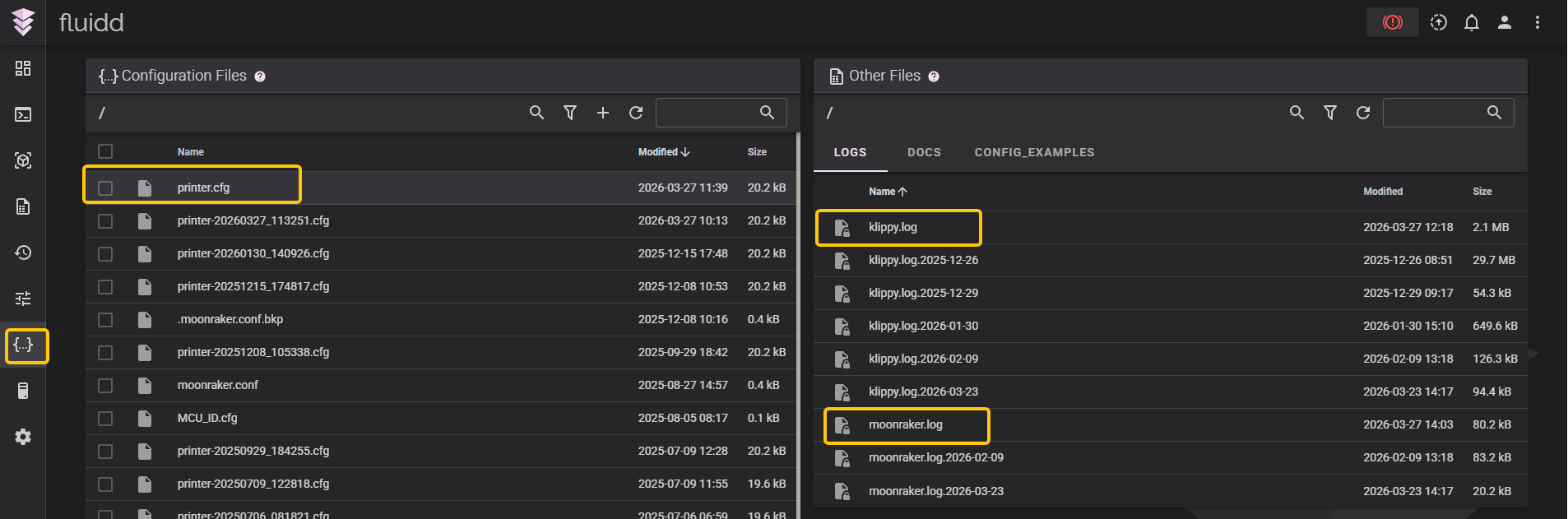
- Log files
There are three log files: printer.cfg / klippy.log / moonraker.log. Please refer to the link below to access Fluidd and obtain the log files
https://wiki.elegoo.com/neptune/neptune-4-series-web-page-control
- G-code file – the model file that was being printed when this error occurred
- SN code (white sticker located at the lower left corner of the heated bed, format: NEP X.XXXXX.XXXXX)
- Current firmware version – Path: Touchscreen → Settings → About Machine